How to Create UGC Ads with AI in 2026 — A Step by Step Guide
Learn how to create UGC-style video ads with AI in under 10 minutes. Step by step guide covering scripts, avatars, voiceovers, and what actually converts on Meta and TikTok.
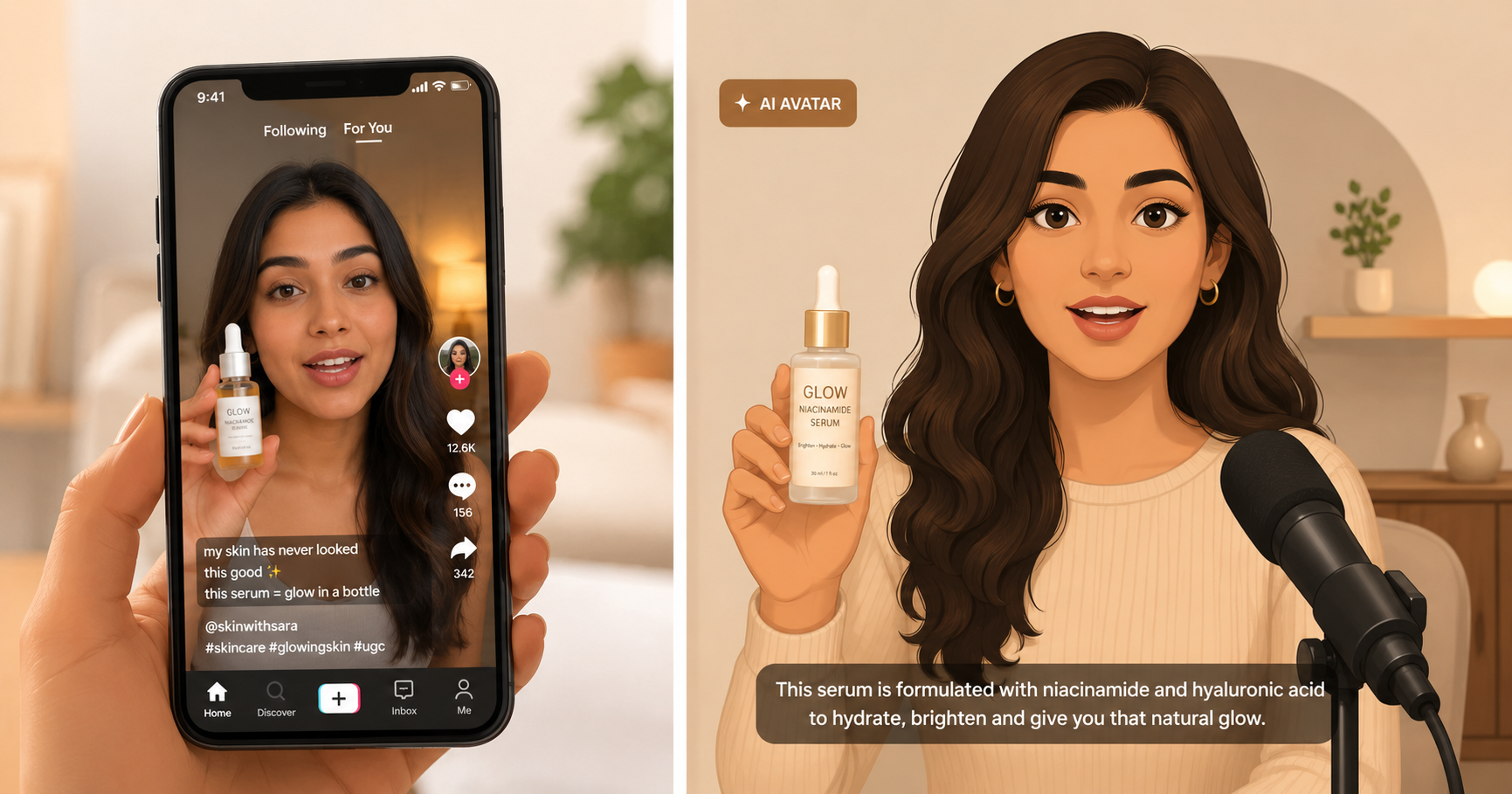
Table of Contents
What This Guide Covers
AI UGC video ads cost under $2 each and take about 10 minutes to make from scratch. No creators, no scheduling, no revision rounds. This guide walks you through the exact process — script, avatar, voice, and export — so you can go from a product description to a finished ad ready to run on Meta or TikTok.
If you want to understand the broader landscape first, the best AI UGC ad generators in 2026 post compares the main tools side by side. This guide focuses specifically on the creation process.
What is a UGC Ad and Why Does It Work?
UGC stands for user-generated content. In paid advertising, it refers to short videos that look like a real person talking about a product on their phone — casual, unpolished, direct to camera. Not a studio shoot. Not a brand voiceover over a product shot. Just someone holding your product and talking about it like they discovered it themselves.
The reason it works is simple. People scroll past ads that look like ads. They stop for content that looks like something a real person posted. A UGC ad blends into the feed. It lowers your audience's guard before they realize they are watching a pitch.
The numbers are consistent across platforms. UGC-style ads generate around 4x higher click-through rates compared to standard branded video creative, with significantly lower cost per click on Meta and TikTok. For a DTC brand running paid ads, that gap is the difference between a profitable campaign and one that drains budget.
What Do You Need Before You Start?
Three things and nothing more.
A product. Either a URL to your product page, a product image, or a short description of what you sell and who it is for.
A script or a brief. You can write your own or let the AI generate one from your product details. If you write your own, keep it under 90 words for a 30-second ad. The structure that consistently converts is: hook (stop the scroll in the first 2 seconds), problem (make them feel seen), solution (your product as the answer), CTA (tell them what to do next).
An AI ad tool. Something like inReels, which takes your product, generates a script, pairs it with an AI avatar, and produces a finished video. There are other options covered in the AI UGC generator comparison if you want to evaluate before picking one.
That is genuinely all you need. No camera, no creator account, no video editing software.
How to Create a UGC Ad with AI — Step by Step
Here is the exact process from zero to a finished video.
Step 1 — Write your hook first
Before you open any tool, spend 5 minutes on the hook. The hook is the first 2 to 3 seconds of the video and it decides whether anyone watches the rest.
Strong hooks are specific, not generic. "This serum cleared my skin in 3 weeks" beats "I want to talk about my skincare routine." "I spent $400 on a standing desk and this $30 product fixed what it couldn't" beats "Let me tell you about something I found." The more specific the claim, the more curiosity it creates.
If you are stuck, the UGC hooks that stop the scroll post has 30+ templates organized by product type.
Step 2 — Write or generate your script
Keep it under 90 words for a 30-second video. The structure that works across almost every product category:
- Hook (0 to 3 seconds): one sentence that creates curiosity or names a pain point
- Problem (3 to 10 seconds): make the viewer feel like you understand their situation
- Solution (10 to 22 seconds): what the product does, in specific terms, from personal experience
- CTA (22 to 30 seconds): one clear action — link in bio, use code X, shop now
Most AI ad tools will generate a script from your product URL or description. Use it as a starting point but always read it out loud before you lock it in. If it sounds like marketing copy, rewrite it to sound like something a real person would actually say. For more on script structure, the video ad scripts that convert guide covers this with examples across different ad lengths.
Step 3 — Pick your avatar
Choose based on your audience, not personal preference. If you sell skincare to women 25 to 40, pick an avatar that matches. If you sell supplements to gym-going men, pick accordingly. The closer the avatar looks to your target customer, the stronger the identification effect.
Avatar quality varies a lot across tools. Look specifically at how the lips move during speech, how the eyes behave, and whether the head movement feels natural or stiff. Those three things are what viewers notice subconsciously and what separate a convincing AI UGC ad from an obvious one.
Step 4 — Generate and review
Hit generate. Most tools take 2 to 5 minutes. When it comes back, watch it once without sound first. Check that the avatar looks natural, the product is visible, and the framing works for a vertical 9:16 mobile feed. Then watch with sound and check that the lip-sync feels believable, the pacing is right, and the hook lands within the first 2 seconds.
Step 5 — Add captions
Non-negotiable. Around 85% of people on Instagram and TikTok watch videos without sound. Captions are how most of your audience will actually consume the ad. Most tools have built-in captioning. If yours does not, run the video through CapCut before exporting.
Step 6 — Export and test
Export in 9:16 for Reels, TikTok, and Stories. Export in 1:1 if you are also running feed placements on Meta. For your first batch, create 3 to 5 variations with different hooks. Run them at small budgets — $10 to $20 per day — and let the data tell you which hook resonates. The UGC ad KPI benchmarks post covers exactly what numbers to watch in the first 48 hours.
What Makes a UGC Ad Actually Convert?
Most AI UGC ads fail not because the technology is bad but because the script is generic. Here is what consistently separates a converting UGC ad from one that gets ignored.
Specificity in the hook. "This changed my skin" is weak. "I stopped getting breakouts in the second week" is strong. Specific claims create curiosity and credibility at the same time.
A real problem, not a feature list. Nobody wakes up thinking about your product's ingredients. They wake up thinking about their oily skin, their sore back, their slow Shopify store. Lead with the problem they recognize, then connect your product as the solution.
Short sentences throughout. Read your script out loud. If you run out of breath on a sentence, it is too long. UGC ads sound like a text message, not a press release.
One CTA. "Check the link in bio, use code SAVE20, and also follow for more" is too much. Pick one action and say it clearly.
The UGC ad frameworks for TikTok and Meta post breaks down five specific structures — before and after, problem-agitate-solve, story arc, reaction, and listicle — with examples of each.
AI UGC vs Real Creators — When Should You Use Which?
AI UGC is not always the right call. Here is an honest breakdown.
| Situation | AI UGC | Real Creators |
|---|---|---|
| Testing 5 to 10 hook variations fast | Yes | Too slow and expensive |
| Need a video in the next 2 hours | Yes | No |
| Building a personal brand around a real face | No | Yes |
| Campaign needs genuine testimonials | No | Yes |
| Scaling a winning creative into 20 variations | Yes | Rarely |
| Niche where authenticity is everything | Test first | Probably yes |
| International campaigns in multiple languages | Yes | Expensive |
The honest take: AI UGC is best for finding winners fast. Once you know which hook and script convert, you can invest in real creator content for that specific angle and scale it. The two approaches work together rather than against each other.
The full breakdown of cost, speed, quality, and trust tradeoffs is in the AI UGC vs real creator comparison.
What Are the Most Common Mistakes to Avoid?
Using the AI-generated script without editing it. AI scripts default to marketing language. Read it out loud. If it sounds like a brand wrote it, it will perform like a brand ad, not a UGC ad.
Picking the wrong avatar for your audience. An avatar that looks nothing like your target customer creates distance instead of identification. Spend 2 minutes on this.
Skipping caption review. Auto-captions sometimes get words wrong, especially brand names and product-specific terms. Always read through before publishing.
Running only one variation. One video gives you one data point. Generate at least 3 with different hooks. The difference in CTR between the best and worst hook in a batch is often 3x or more.
Judging the video by how it looks to you, not the data. Your opinion of which ad looks best is usually wrong. Run them. Let the numbers decide.
Frequently Asked Questions
How much does it cost to create a UGC ad with AI?
Most AI UGC tools price per video or per credit. On inReels, plans start at $9 per month with credits included. Individual video costs typically range from $0.50 to $3 depending on length and quality settings. That compares to $150 to $500 for a real UGC creator video — a significant reduction for brands testing creative at volume.
How long does it take to generate an AI UGC ad?
Most tools take 2 to 5 minutes from generating the script to delivering the finished video. End to end, including writing your brief and reviewing the output, you are looking at 15 to 20 minutes for your first video and under 10 once you have a repeatable process.
Will people be able to tell the ad is AI-generated?
With current technology, a well-made AI UGC ad is difficult to distinguish from real creator footage, especially on a mobile screen during a scroll. The key variables are avatar quality, lip-sync accuracy, and how natural the script sounds. A stiff, generic script will make even a technically good avatar feel artificial. A conversational, specific script with a high-quality avatar is genuinely hard to detect.
What products work best for AI UGC ads?
AI UGC works best for physical products where the ad format is demonstrational — skincare, supplements, fashion accessories, fitness equipment, home goods, kitchen products. It works less well for products that require hands-on demonstration or where brand credibility depends heavily on real user trust, like medical devices or high-ticket financial products.
Can I use AI UGC ads on Meta and TikTok?
Yes. Both platforms allow AI-generated content in ads. TikTok added a disclosure requirement for realistic AI-generated content in 2025 — a small label noting AI generation. Meta has similar guidelines in draft as of mid-2026. Check current platform policies before running, as these update regularly.
How many variations should I create for a new product?
Start with 3 to 5 variations testing different hooks. Keep everything else constant — same avatar, same product, same CTA — and only change the first 3 seconds. Once you find a hook that outperforms the others, then test different scripts, avatars, and CTAs as separate experiments.
Start Creating UGC Ads Today
The fastest way to see if AI UGC works for your product is to make one and run it. inReels lets you go from product to finished ad in under 10 minutes — paste a URL, describe your product, or upload an image, and the platform handles the script, the avatar, and the video.
You can start with the free AI UGC video generator to see the output quality before committing to anything.
If you are still figuring out your ad strategy, the video ad formats that convert post covers talking head ads, before-and-after formats, product showcase ads, and when to use each.
Start Creating Video Ads Today
Create UGC-style video ads in minutes. No creators, no waiting, no expensive production. Perfect for TikTok, Instagram Reels, YouTube Shorts, and more.
Try inReels Free →No credit card required