Instagram Ad Maker Guide — Reels, Stories, and Feed Ads in 2026
Complete guide to creating Instagram video ads in 2026. Reels, Stories, and Feed specs, what creative format works on each placement, and how to make Instagram ads with AI in under 10 minutes.
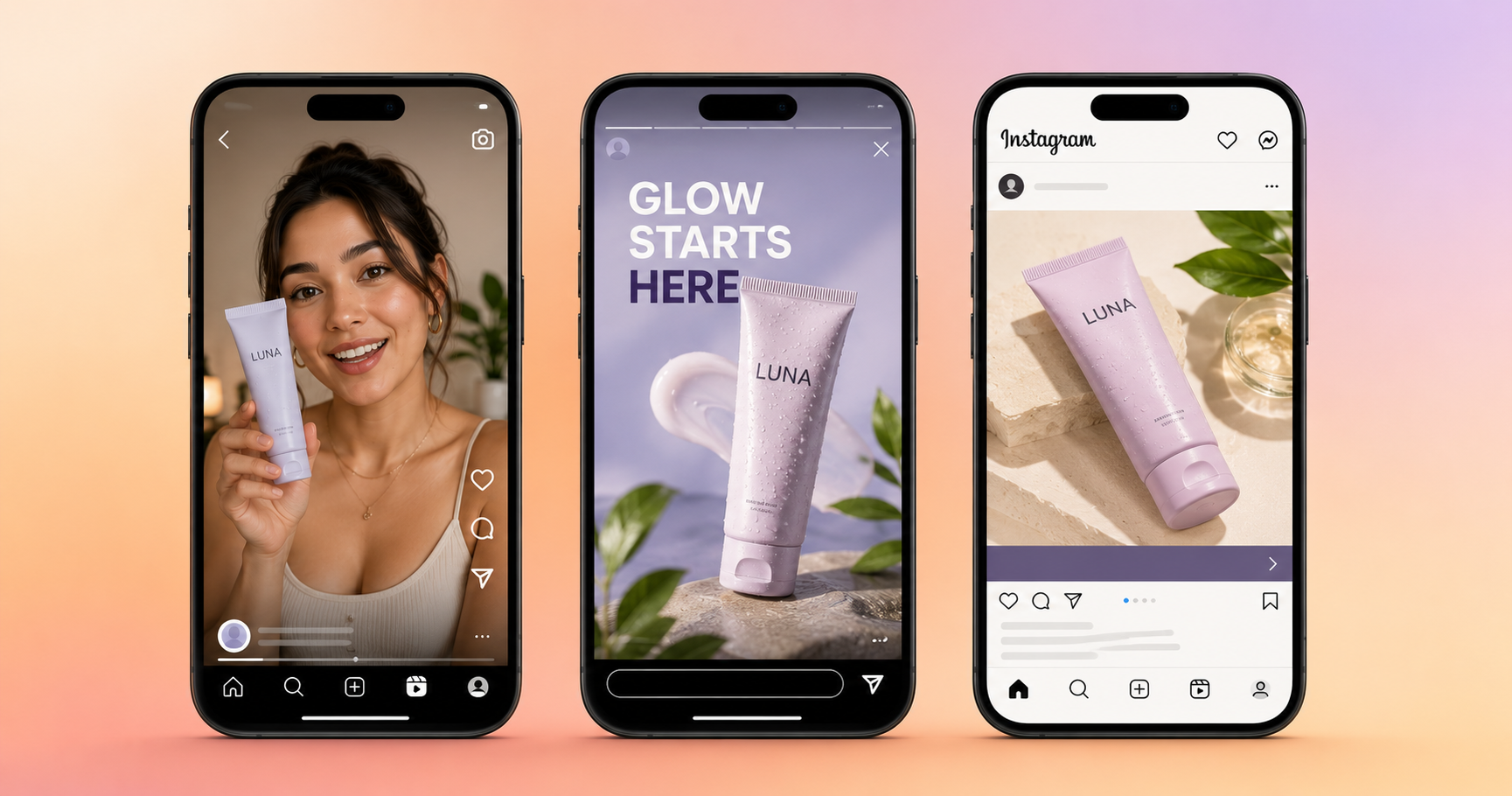
Table of Contents
Why Instagram Is Still One of the Best Platforms for Video Ads
Instagram has over 2 billion monthly active users and remains the highest-engagement social platform for visual products. For DTC brands, Instagram video ads consistently outperform every other format on Meta's network for audiences between 18 and 45. Reels in particular have changed how ads perform on the platform, with reach that was previously limited to followers now extends to non-followers through the Explore and Reels feeds, making cold-audience video ads significantly more effective than they were two years ago.
With AI tools like inReels, creating a finished Instagram video ad takes under 10 minutes from a product URL or image. This guide covers every Instagram ad placement, the correct specs for each, what creative format works where, and the exact workflow to produce Instagram ads with AI. For the full UGC creation process, the step by step guide to creating UGC ads with AI goes deeper on scripts and avatars. For the 15 formats that convert, the UGC ad examples guide has templates for each one.
What Are the Different Instagram Ad Placements?
Instagram has four main ad placements, each with different audience behaviors and creative requirements. Understanding where your ad appears changes how you should write the script and frame the visual.
Instagram Reels
The highest-reach placement on Instagram in 2026. Reels surfaces content to non-followers through the Reels feed and Explore tab, making it the most powerful placement for cold-audience acquisition. The algorithm rewards content that keeps people watching, and native-looking UGC video consistently outperforms polished brand creative here because Reels users are in a discovery mindset rather than a shopping mindset.
Reels ads appear between organic Reels as full-screen vertical content. They are labeled "Sponsored" but otherwise look identical to organic posts. This is precisely why UGC-style content works so well here, as it blends into the feed rather than standing out as an interruption.
Instagram Stories
Full-screen vertical format that appears between organic Stories. Users in Stories are in a fast-swiping mindset, which means you have less than 2 seconds to stop the skip. The hook needs to be immediate, such as a face looking directly at camera, a surprising visual, or a bold text statement in the first frame.
Stories have a 15-second video limit for ads, which is a creative constraint that forces discipline. Every second counts. Stories works particularly well for time-sensitive offers and retargeting audiences who have already visited your product page.
Instagram Feed
The original Instagram placement. Feed users are scrolling more slowly and have slightly longer attention spans than Reels or Stories users. Square (1:1) or vertical (4:5) format. Feed performs better for higher-consideration products where the viewer needs more information before clicking.
Feed video autoplays muted, so captions are mandatory. A caption that tells the story independently of the audio is what separates a Feed ad that works from one that gets scrolled past silently.
Instagram Explore
Explore ads appear in the Explore tab when users are browsing content outside their follow list. The audience here is in a high-discovery mindset, and they are actively looking for new content and accounts. Explore tends to work well for products that have strong visual appeal because the user is already in browsing mode.
For most brands starting with Instagram ads, the priority order is: Reels first, Stories second, Feed third. Explore is handled automatically when you use Advantage+ placements.
What Are the Instagram Ad Specs for 2026?
Using the wrong specs gets your ad rejected or renders it incorrectly on certain placements. Here are the current specs for every Instagram ad placement.
Instagram Reels:
| Spec | Requirement |
|---|---|
| Aspect ratio | 9:16 (vertical) |
| Resolution | 1080x1920 recommended |
| Maximum length | 90 seconds |
| Recommended length | 15 to 30 seconds |
| File format | MP4 or MOV |
| Maximum file size | 4GB |
| Frame rate | 23 to 60 fps |
| Safe zone | Keep key visuals centered, avoid top 14% and bottom 35% (UI overlays) |
Instagram Stories:
| Spec | Requirement |
|---|---|
| Aspect ratio | 9:16 |
| Resolution | 1080x1920 |
| Maximum length | 15 seconds (video) |
| File format | MP4 or MOV |
| Maximum file size | 4GB |
| Safe zone | Keep text and key visuals in center 1080x1420 |
Instagram Feed (Video):
| Spec | Requirement |
|---|---|
| Aspect ratio | 1:1 (square) or 4:5 (vertical) |
| Resolution | 1080x1080 (square), 1080x1350 (4:5) |
| Maximum length | 60 seconds |
| Recommended length | 15 to 30 seconds |
| File format | MP4 or MOV |
| Maximum file size | 4GB |
The practical rule: Produce everything in 9:16 at 1080x1920. This covers Reels, Stories, and Explore natively. For Feed, Meta will adapt vertical content to square automatically, but results are better when you produce a 1:1 version separately. Most brands start with 9:16 only and add 1:1 once they have proven creative to adapt.
Safe zones matter on Reels. The Instagram Reels interface overlays UI elements at the top (account name, follow button) and bottom (like, comment, share buttons, caption). Keep your hook text and product visuals in the center 60% of the frame to avoid being covered by these overlays.
What Creative Format Works Best on Each Instagram Placement?
The same video does not perform equally across all Instagram placements. Here is what works where and why.
On Instagram Reels: UGC Talking Head
Reels rewards content that looks native. A person speaking directly to camera in a casual home setting, holding a product, talking about it in first person — this is the format that consistently generates the highest CTR on Reels for cold audiences. The talking head ads guide covers why this format works and how to script it.
The script for a Reels ad should open with a hook that feels like something you would hear from a creator you follow, not something you would read in an ad. "I need to talk about this product" beats "Introducing [Brand Name]'s new formula" every time.
On Instagram Stories: Fast Hook Plus Single Benefit
Stories users are moving fast. The 15-second limit is also an opportunity for a tight, well-structured 15-second ad that delivers one clear message converts better than a longer ad that tries to say too much. Open with a face looking directly at camera or a bold visual in the first frame, state the benefit in one sentence, and end with a clear swipe-up CTA.
On Instagram Feed: Product Showcase or Before and After
Feed users scroll more slowly and tolerate slightly more information. Product showcase video (cinematic product close-up with text overlays) and before-and-after formats both perform well here. Since Feed video autoplays muted, the visual needs to tell the story independently of the audio. Text overlays are more important on Feed than on Reels.
On Instagram Explore: Curiosity Hook
Explore users are in a discovery mindset. Content that creates curiosity, an unexpected claim, a surprising result, a format they have not seen before will perform well here. The UGC hooks that stop the scroll post has templates specifically designed to generate curiosity in cold audiences.
How Do You Make Instagram Ads with AI?
The AI workflow for Instagram ads is straightforward and produces a finished video in under 10 minutes. Here is the exact process.
Step 1: Write your hook before anything else
Open a notes app before you open any AI tool. Write three to five different hooks for your product. Each hook is one sentence that could make a stranger stop scrolling. Keep them specific - "this cleared my skin in 19 days" works, "this skincare product is amazing" does not. The UGC hooks guide has 30+ templates if you need a starting point.
Step 2: Generate your script
For a 30-second Reels ad, keep the script under 90 words. Structure: hook (0 to 3 seconds), problem the audience recognizes (3 to 10 seconds), product as the solution (10 to 22 seconds), CTA (22 to 30 seconds). For a 15-second Stories ad, cut the structure to: hook (0 to 2 seconds), benefit (2 to 12 seconds), CTA (12 to 15 seconds).
Read the script out loud before generating. If any sentence sounds like it was written by a marketing team, rewrite it in plain conversational language.
Step 3: Generate the video on inReels
Go to inReels, paste your product URL or upload a product image, enter your script, and select an avatar. Pick an avatar that demographically matches your target customer on Instagram. Generate — takes 3 to 5 minutes for a finished 9:16 video with lip sync and voice.
Step 4: Add captions and review
Add captions before exporting. Review them for accuracy, as brand names and product-specific terms get mistranscribed frequently. Check that the hook appears within the first 2 seconds and that the CTA is visible before the video ends.
Step 5: Create multiple hook variations
Change only the first 3 seconds across 3 to 5 variations. Upload all variations to Meta Ads Manager and let Advantage+ Creative optimize delivery toward the best performer. The UGC ad KPI benchmarks guide covers what numbers to watch in the first 48 hours.
Should You Run Ads on Instagram or Facebook?
The honest answer is both, through the same campaign. When you run ads through Meta Ads Manager, you can choose to show them on Facebook only, Instagram only, or across all Meta placements simultaneously. For most DTC brands, running across all placements with Advantage+ optimization gives the algorithm the most options to find buyers, as it will allocate spend toward whichever placement performs best for your specific product and audience.
That said, certain product categories consistently perform better on Instagram than Facebook and vice versa.
| Product Category | Better Platform | Reason |
|---|---|---|
| Fashion and beauty | Younger, more visual audience | |
| Home decor and lifestyle | Aspirational browsing behavior | |
| Supplements and health | Older audience with more purchase intent | |
| Tech and gadgets | Both | Depends on price point |
| Food and drink | Both | Depends on product positioning |
| B2B tools | Professional mindset audience |
If you are just starting, set up one campaign with Advantage+ placements turned on and let Meta decide where to spend. After two weeks of data, look at the placement breakdown in your ads manager to see which placements are generating the best cost per result for your specific product. Then you can make informed decisions about where to concentrate.
Frequently Asked Questions
How much does it cost to run Instagram video ads?
Instagram ad costs vary by audience, product category, and time of year. Typical CPMs range from $6 to $20 for most DTC product categories. Cost per click typically runs $0.50 to $2.50 for well-optimized UGC video creative. The cost to produce the video with AI is separate, and if using inReels, that is under $2 per video on most plans. The media spend you pay Instagram to show the ad is typically 10 to 20x your production cost.
What is the minimum budget to test Instagram video ads?
You can get meaningful data with $150 to $300 in total ad spend. Run 3 hook variations at $10 to $20 per day each for 3 to 5 days. You are buying data on which hook your audience responds to, not necessarily a profitable sale in this phase. Once you identify the winning hook, increase budget to $30 to $50 per day and optimize for purchase.
Do Instagram video ads need captions?
Yes, always. Instagram Reels autoplay with sound on by default, but many users have their phone muted or are in a public place. Stories autoplay muted. Feed video autoplays muted. Captions ensure your message gets through regardless of sound settings. Ads with captions typically see 12% higher view time than ads without.
Can I use the same video for both Instagram Reels and Facebook Reels?
Yes. A 9:16 video at 1080x1920 meets the specs for both Instagram Reels and Facebook Reels. When you set up your campaign in Meta Ads Manager with Advantage+ placements, the same creative will run across both automatically. The ad system handles placement and delivery, you just upload one video.
Why are my Instagram video ads getting views but no clicks?
The most common reason is a weak or missing CTA. If your video ends without explicitly telling the viewer what to do next, most will not do anything even if they enjoyed the content. The CTA should be in the last 5 to 8 seconds of the video and in the caption. Also check that your landing page loads quickly on mobile, as a slow product page kills conversion even when the ad creative is strong.
How often should I refresh Instagram video ad creative?
Creative fatigue on Instagram typically sets in after 7 to 14 days of consistent spending against the same audience. Signs of fatigue: rising CPM, falling CTR, rising cost per purchase. When you see two or more of these moving in the wrong direction simultaneously, introduce new creative variations. The solution is almost always a new hook rather than a completely different video, the UGC hooks guide has 30+ options to cycle through.
Make Your First Instagram Video Ad Today
inReels lets you go from a product URL or image to a finished 9:16 Instagram video ad in under 10 minutes. Script, AI avatar, voice, lip sync, and vertical export are all included. Plans start at $9 per month.
The free AI UGC video generator lets you see the output quality before committing to anything.
For the formats that work on Instagram, the UGC ad examples guide breaks down 15 templates with script structures and when to use each. For hooks that stop the scroll on Reels, the UGC hooks guide has 30+ templates organized by product type.
Start Creating Video Ads Today
Create UGC-style video ads in minutes. No creators, no waiting, no expensive production. Perfect for TikTok, Instagram Reels, YouTube Shorts, and more.
Try inReels Free →No credit card required